Specifications
I provided redlines and component documentation to explain the intended UI and give developers a concrete reference during implementation.

I led UX for a redesign of Encompass Web eFolder, working with product and engineering to organize mortgage document work around the person, the task, and the handoff needed to move a loan toward closing.
eFolder supports document work across loan manufacturing—the steps different teams complete to move a loan toward closing. Each role needs different information and actions, but its work affects what another person can do next.
The redesign had to support the immediate task in front of each person while preserving the workflow connections that keep a loan moving.
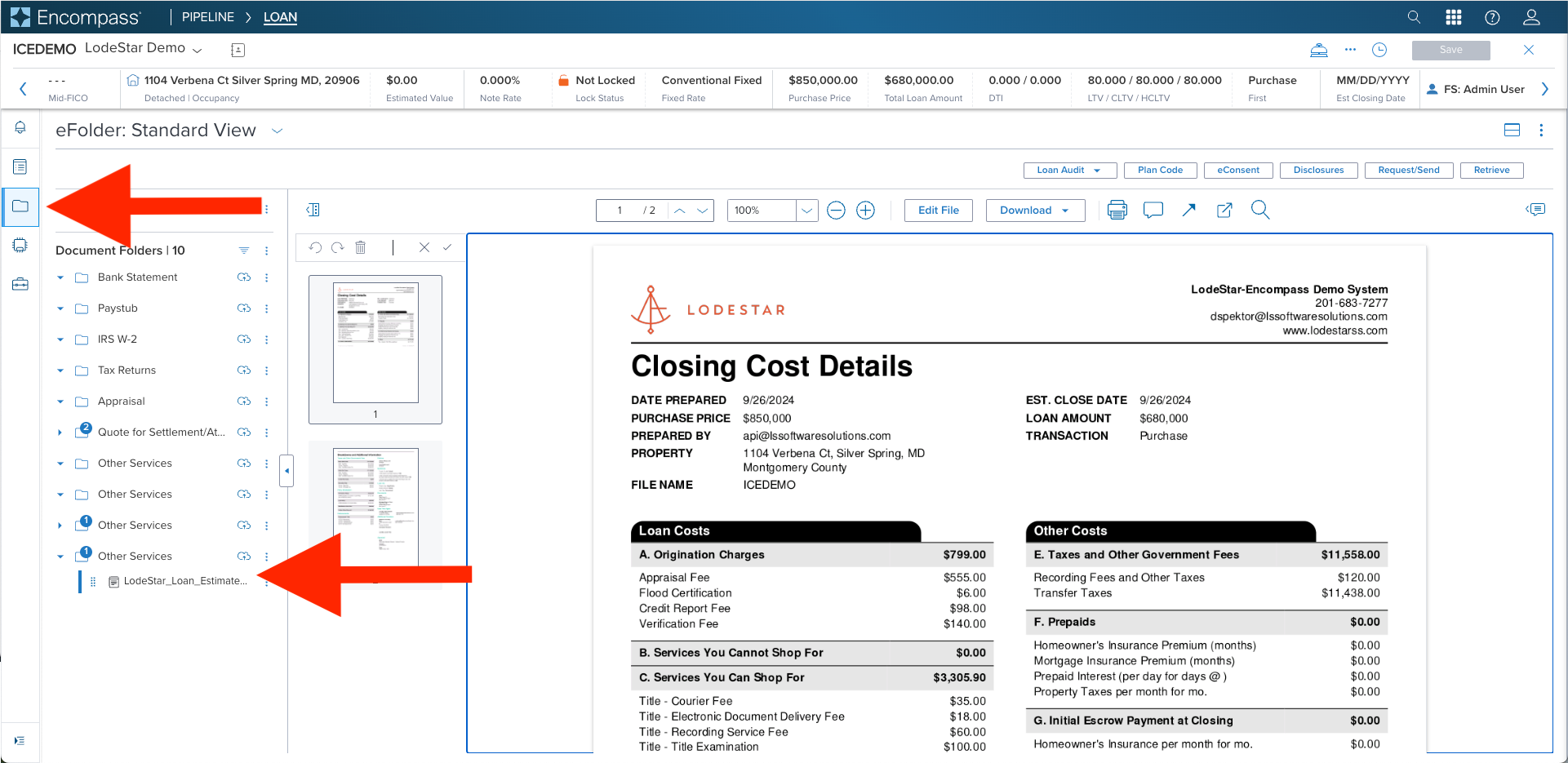
Encompass Web eFolder workspace. The screen illustrates the document-centric environment and role-specific controls that informed the redesign.
The existing approach put a broad set of information and controls in front of users, regardless of the task they were trying to complete. That created competing demands on their attention and an interface that was increasingly difficult for engineering to implement and maintain.
As Staff UX Designer, I led the redesign with product and engineering. My responsibility was to translate different role needs into focused interactions, then carry those decisions through detailed specifications, implementation reviews, and UX validation.
Document requests and review made the need for role-specific UI concrete. A loan officer needed to request documents. Underwriters and other reviewers needed to view those documents, approve them, identify missing information, or request additional documents. They were contributing to the same loan, but their tasks required different controls and detail.
Working with product and engineering, I helped shape the interface around those responsibilities. Underwriting-specific controls and detail did not belong in the loan officer’s document-request task. The design focused that view on requesting documents, while the review experience supported the decisions underwriters and other reviewers needed to make.
Those actions also connected the roles. A document request, approval, or request for additional information would trigger a workflow event, notifying the relevant user of the next task. This allowed the UI to stay focused on the person’s immediate responsibility while the workflow carried the handoff forward toward closing.
This was a slow, iterative effort. Different roles depended on the same document workflow, so simplifying one task required careful discussion of the work around it.
I worked early and often with product and development to resolve scope, technical constraints, and API limitations before finalizing designs. My front-end experience helped connect visual and interaction decisions to implementation questions.
I used design reviews and detailed specifications to make those decisions explicit, giving product and engineering a shared reference to review, refine, and build from.
Alongside the product work, I was an early contributor to the shared design system. I helped shape component documentation and contributed to React-based components with WCAG 2.1 AA requirements.
That foundation gave the eFolder work a more consistent way to specify recurring controls, document interaction states, and review implementation quality.
Uploader component specification: I documented the modal, drag-and-drop behavior, supported file paths, and placement within the eFolder document experience so design intent could be implemented consistently.
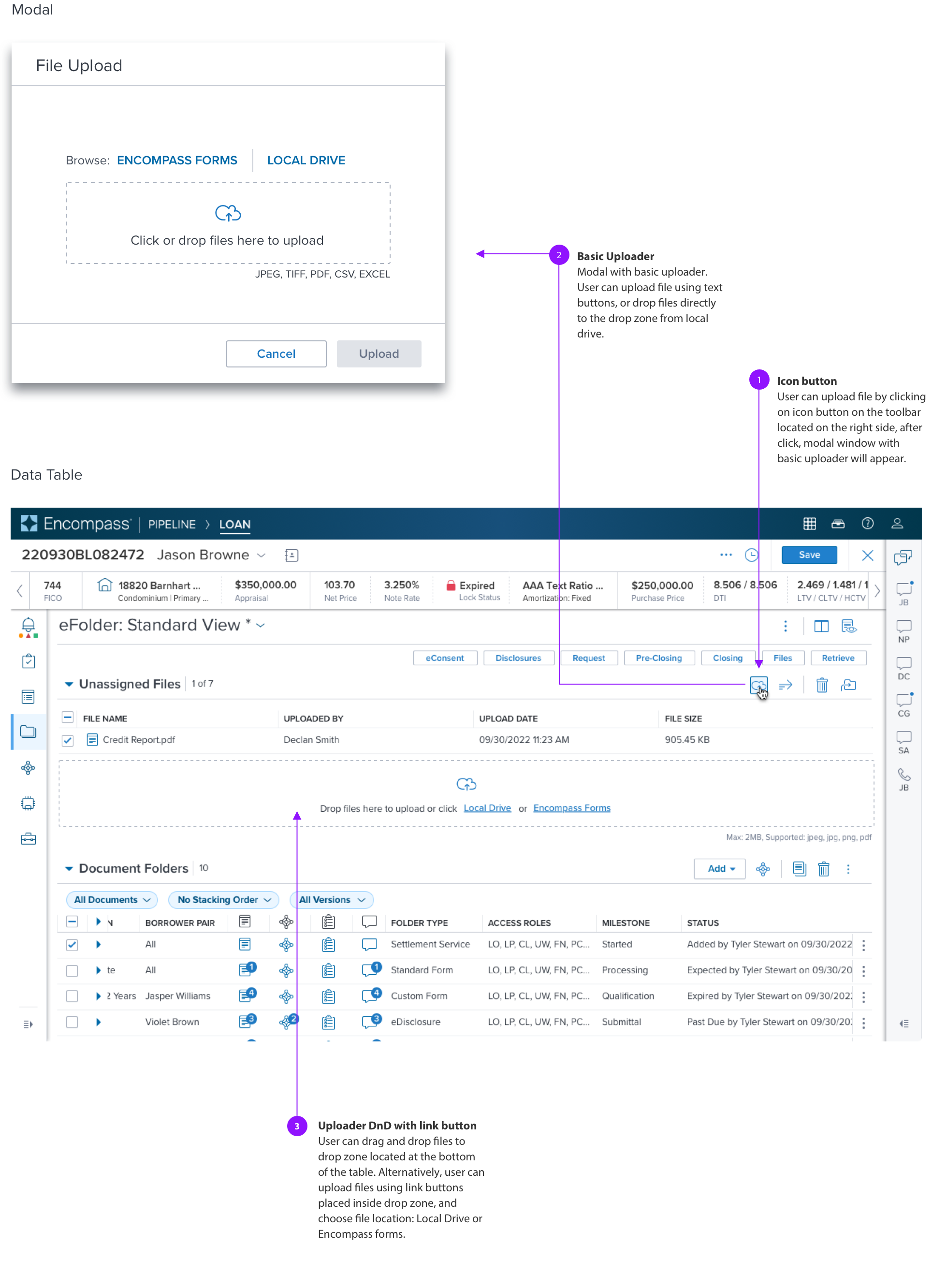
My involvement continued beyond design delivery. I used specifications, implementation reviews, and UX validation to identify visual and interaction defects before release.
That process helped preserve the intended hierarchy, behavior, accessibility expectations, and workflow clarity as the product moved from design into production.
I provided redlines and component documentation to explain the intended UI and give developers a concrete reference during implementation.
I reviewed the implemented experience with developers, identified UI and interaction defects, and helped resolve discrepancies before pull requests.
I supported final UX reviews and user acceptance testing before production, checking that the implemented experience reflected the intended tasks and interactions.
The central shift was a shared approach to role-specific tasks and the events connecting them. My contribution combined interaction design with the detailed collaboration required to make that approach implementable.
This work reinforced why I involve engineering early and stay involved through review: the value of a focused interface depends on whether the underlying workflow and the implementation support it.